Send Action Errors to a Channel
When an action returns an error, you can send the error details to another channel. This allows you to run error-handling actions or consolidate results from multiple actions.
If you do not configure error output for an action, processing from that action stops when an error occurs.
Configure Error Output
-
Open the Studio tab of the Flux App in Soracom Flux Studio.
For more details, see Open a Flux App.
-
Open the action for which you want to configure error output.
-
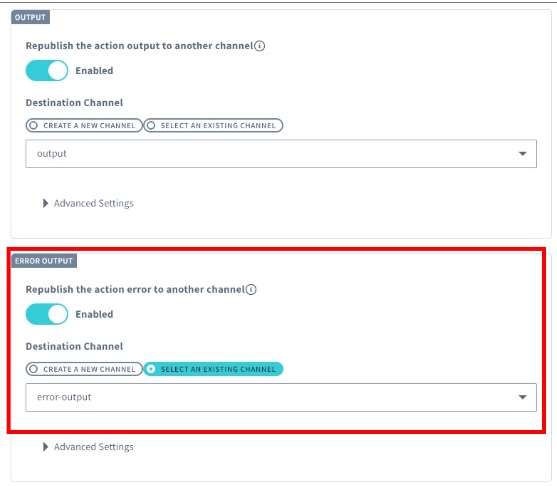
Error Output: Enable Republish the action error to another channel.
-
Specify the destination channel:
-
Create a new channel: Enter a name in Channel Name.
- Select an existing channel: Choose the channel from the dropdown list.
-
-
Click Update.
An error output channel is added to the action.
Advanced Settings
Under Error Output > Advanced settings, you can transform the data before sending it to another channel. For details on behavior shared with action output settings, see Advanced Action Output Settings.
Enable Transform data and configure the following fields:
| Field | Description |
|---|---|
| Content-Type | Specify the Content-Type of the data to be sent to another channel. |
| Content | Configure the transformation content. The transformed result is treated as the error output. Use ${payload.xxx} to reference the input to the action. Use ${error.xxx} to reference the error details. |
Example: Send both the action input (${payload}) and the error details (${error}) together.
{
  "payload": "${payload}",
  "error": "${error}"
}
In error output, ${result} is null.
You can extract or compute intermediate data during the Flux App execution. For details on supported expressions, see Use Expressions in Actions.