Account Type
A Soracom account is called an Operator. Each operator has an Account Type (Individual or Business), which you must select when creating an account, and an Operator ID (a unique identifier beginning with OP followed by 10 digits, such as OP0123456789), which is assigned to the account when it is created.
- Account Type: determines how your account is billed and which payment and tax-related options are available.
- Operator ID: used to identify your account, such as when working with the Soracom API, when signing in as a SAM user, or when contacting Soracom Support.
Once an operator has been created, its Account Type and Operator ID cannot be changed.
Viewing Your Operator ID and Account Type
To view your Operator ID and account type:
- Sign in to the User Console.
-
Click your email address (or username if signed in as a SAM user) in the top right corner.
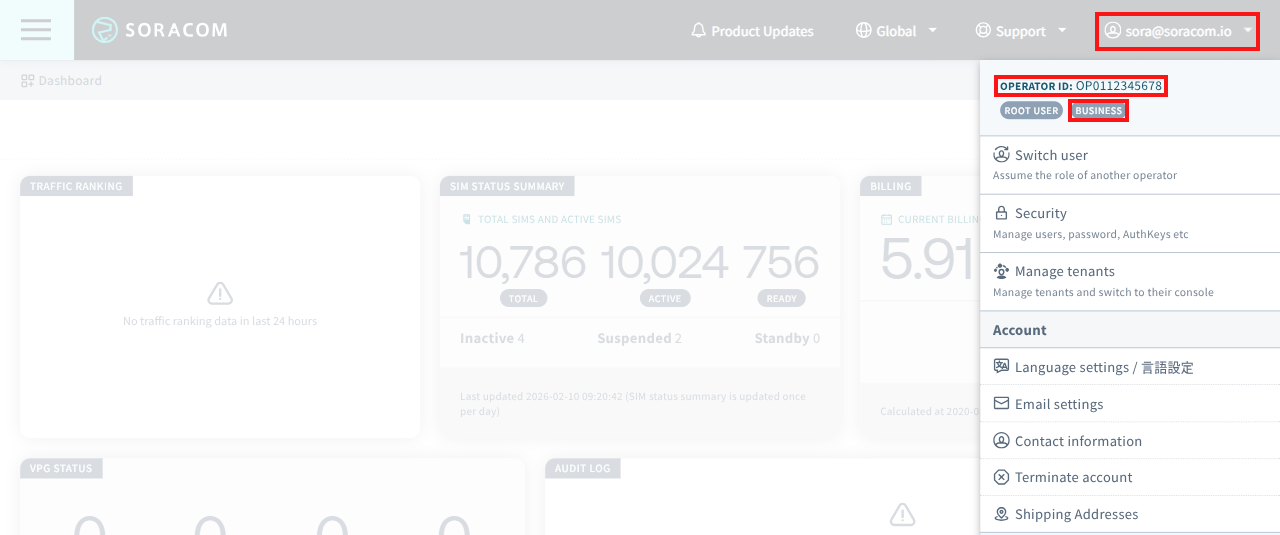
Your account type is displayed below the Operator ID.
Differences by Account Type
The following differences apply depending on the account type:
| Item | Individual | Business |
|---|---|---|
| Available payment methods | Credit card | Credit card or bank transfer*1 |
| Contact Information changes | Allowed | Allowed, excluding company name*2 |
| VAT ID (EU and UK accounts) | Not required | Required*3 |
*1 - Enabling bank transfer requires submitting a request. See Paying by Bank Transfer.
*2 - Changing company name requires submitting a request. See Updating Contact Information.
*3 - For VAT requirements and other tax rules that apply, see Tax Information.
Changing Your Account Type
You cannot change the account type after account creation. The Terms and Conditions and billing configurations that apply at signup differ by account type.
To switch from an Individual account to a Business account, create a new Business account and transfer your IoT SIMs. For details, see Transferring Soracom IoT SIMs.
Only IoT SIMs can be transferred between accounts. Account settings, configurations, users, dashboards, apps, credentials, history, and other resources cannot be transferred.