SQL Assistant
The SQL Assistant is the AI assistant built into Soracom Query Studio. Describe what you want to know in plain language, and the SQL Assistant generates a SQL query against your Soracom data and returns a result you can view as a chart or a table, or download as CSV.
The SQL Assistant answers questions in both modes. How many queries a single question executes depends on Agent Mode, which is always on in Simple Mode and can be turned on or off in Advanced Mode.
Opening the SQL Assistant
-
Sign in to the User Console as the Root user and select the appropriate coverage type.
-
From the Menu, expand Soracom Query and select Soracom Query.
-
Click Launch Soracom Query Studio.
Soracom Query Studio opens at
https://query.soracom.io. -
Click Advanced.
Soracom Query Studio opens in Simple Mode. Advanced Mode puts the SQL Assistant alongside the SQL query editor and shows the Agent Mode toggle.
For a worked example, see Show Connection Trends using Query.
Agent Mode
Agent Mode determines whether the SQL Assistant runs the queries it writes. With Agent Mode off, the SQL Assistant writes SQL and stops. With Agent Mode on, it writes SQL, runs it, looks at the results, and keeps going until it has an answer.
The Soracom Query Studio mode you are in determines whether you can change this:
| Studio mode | Agent Mode | Assistant controls |
|---|---|---|
| Simple | Always on | The Agent Mode toggle is not shown. Advanced Settings appears in the SQL Assistant panel after your first question. |
| Advanced | Off by default | The Agent Mode toggle and Advanced Settings, in the SQL Assistant panel beside the SQL query editor. |
Soracom Query Studio opens in Simple Mode, where Agent Mode is always on. To turn Agent Mode on or off, select Advanced, then use the Agent Mode toggle in the SQL Assistant panel beside the SQL query editor. In Advanced Mode the toggle starts off.
Agent Mode is on for every question asked in Simple Mode, including the preset questions on the Simple Mode start screen.
Reloading Soracom Query Studio returns you to Simple Mode, where Agent Mode is on again. Select Advanced each time you want the Agent Mode toggle.
What Happens When You Ask a Question
With Agent Mode off, the SQL Assistant generates a SQL query and displays it in the SQL query editor. Nothing runs until you click Run Query, so you can read the SQL and edit it first.
With Agent Mode on, the SQL Assistant repeats the following until it has an answer:
- It generates a SQL query from your question and the conversation so far.
- It runs the query immediately, without asking you to confirm.
- It checks whether the results answer your question.
- If they do not, it adjusts the query and runs it again.
How many times this repeats depends on the question.
The SQL Assistant stops when it has an answer, or when it pauses to ask whether to continue, as described below. While it is working, each step appears in the conversation with the SQL Assistant's own description of what it is doing:
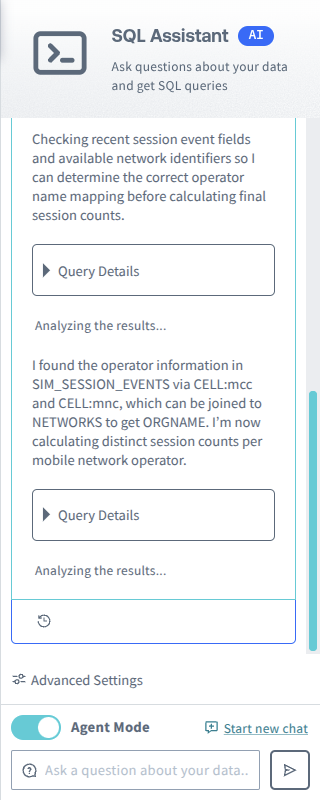
When the SQL Assistant finishes, the steps collapse into a single card with a Show Details disclosure, and each step inside has a Query Details disclosure containing the SQL that was run, along with buttons to copy it to the editor or run it again.
How Many Queries One Question Can Run
Some questions cost a single query; others cost several, and the number is not always predictable in advance. Each query the SQL Assistant runs counts the same as any other.
After running five queries for a single question, the SQL Assistant pauses and asks "I've been running automatically for a while. Would you like me to continue with this analysis?"
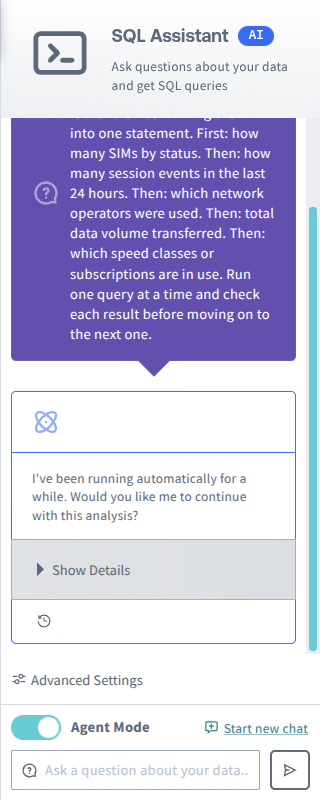
The pause happens after the fifth query has run, so all five count toward your plan.
Query Counting
Every query the SQL Assistant actually runs against your data counts as one query execution, exactly as if you had written and run it yourself. There is no separate allowance for the SQL Assistant's own queries, and no discount for them.
In Agent Mode, a single question may consume more than one query execution: one for each query the SQL Assistant runs.
To decide each execution yourself, turn Agent Mode off in Advanced Mode. The SQL Assistant then writes SQL without running it, and nothing is counted until you click Run Query.
The following are counted:
- A query that runs and returns results, including a query that returns no rows.
- A query that reaches the maximum execution time for your plan and times out.
The following are not counted:
- A query that fails with a SQL error, such as an invalid column name. Soracom Query reports these as
ANA0005. - A query rejected before it runs, because it contains something other than a read operation. Soracom Query reports these as
ANA0012. - SQL that the SQL Assistant generates but never runs, such as when Agent Mode is off.
If you see either error code, you were not charged for that query.
A query that succeeds but whose results then fail to export is still counted.
On the Free plan, query executions draw down your 500 free queries, which are a total allowance rather than a monthly one, so the count does not reset. On the Business and Enterprise plans, they count toward your monthly allowance.
To check where you stand, click the account icon in the top-right corner of Soracom Query Studio. PLAN USAGE shows a used/allowed figure, and it is the same count that queries are charged against. On the Business and Enterprise plans the figure covers the current month; on the Free plan it covers your whole allowance.
The figure is a current total only; there is no history. It also does not separate the SQL Assistant's queries from queries you wrote yourself. To find what a particular question cost in Agent Mode, expand Show Details on its answer and count the query steps, leaving out any that failed with a SQL error (ANA0005) or were rejected before running (ANA0012). See Plan Usage for more.
Reasoning Level
Reasoning Level is a SQL Assistant setting with three options: Low, Medium (Default), and High. With a higher reasoning level, the SQL Assistant may spend longer on your question before answering, and can produce better answers and better SQL.
The control is inside the Advanced Settings disclosure in the SQL Assistant panel, and is available in both modes. In Simple Mode the SQL Assistant panel appears after you ask your first question. The disclosure is collapsed by default; click Advanced Settings to expand it.
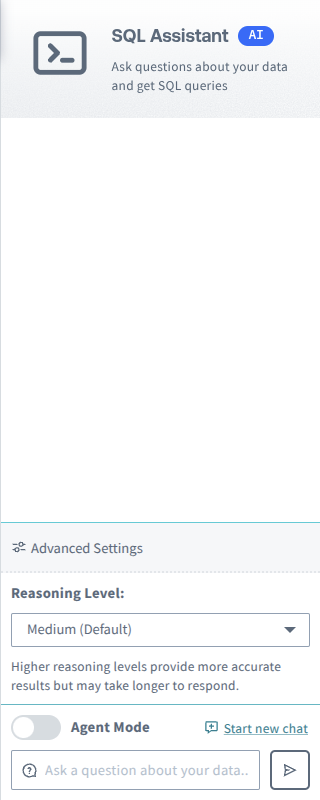
When the reasoning level is set to anything other than Medium, a Reset to Default button appears beside the selector. Clicking it returns the setting to Medium and the button disappears.
The reasoning level is stored in your browser, not in your Soracom account. The setting does not apply to other browsers or computers.
Every query the SQL Assistant runs counts the same, whatever reasoning level produced it.
What the SQL Assistant Can Query
The SQL Assistant writes queries against the tables and views described in the Soracom Query schema reference, plus any user tables registered on your account. Separate schemas apply to Global coverage and Japan coverage.
Soracom Query is read-only. A query that contains anything other than a read operation is rejected before it runs, whether the SQL Assistant generated it or you typed it yourself. Soracom Query reports these as ANA0012: invalid SQL. (Contains unsupported SQL commands.) A rejected query is not counted against your plan.
If the SQL Assistant cannot answer a question with SQL, it returns an explanation instead of a query.
Time Ranges
The SQL Assistant may propose a time range along with its query. When it proposes a relative range (the last so many hours or days), it uses the presets the period selector offers on the editor toolbar: 2, 4, 8, or 12 hours, or 1, 2, 3, 7, or 14 days.
Limitations
- The maximum length of a SQL query is 3,000 characters. A longer query returns an error. If the SQL Assistant produces a statement that exceeds the limit, ask it to simplify the query, or narrow the question.
- Query execution time and the queryable data period are set by your plan. See Plans for the limits that apply to yours.
- Results shown in Soracom Query Studio are limited to a maximum number of rows. This affects only what is displayed and downloaded, not what the query executes.
- The maximum query period is 40 days, and the maximum data reference period is the last 731 days.
Soracom Support is unable to provide assistance regarding SQL queries, such as creating SQL query samples, reviewing or testing SQL queries generated by the SQL Assistant, or providing prompts for SQL query generation.
Writing Better Prompts
- Name the time range you care about. "Over the past 24 hours" and "in July" give the SQL Assistant something concrete to filter on; "recently" does not.
- Say how you want the data shaped (a count, a trend over time, a top-10 list) rather than only naming the subject.
- Ask follow-up questions in the same conversation instead of restating the whole question. The SQL Assistant keeps the context of the conversation, so "now break that down by country" works.
- Start a new conversation when you change topic. Click Start new chat to clear the conversation and start fresh.